The backend your AI agent plugs a website into
Complete, fast and safe.
Whoever edits it.
You don’t have to know everything a good website needs. Connect your coding agent to Uplink: it learns what your site is missing and how to add it, your site stays simple, and nothing goes live until a person says so.
alpineridgelodge.com/uplink
your agent, connected to Uplink
> What can Uplink do for my site?

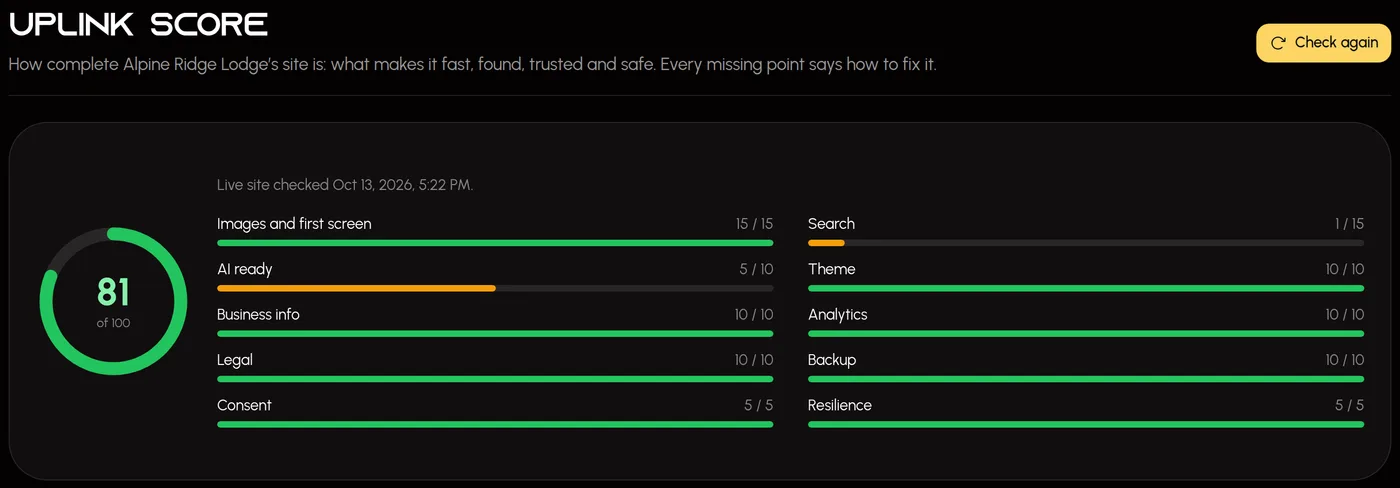
  ✓ site_checkup   Uplink Score 81 / 100
  Full marks for images, theme, analytics,
  consent, legal pages and backup.
  Missing: search titles and descriptions,
  and the questions AI tools can quote.
  → Shall I write them for you to check?
Real screenshots of the Uplink studio, shown with a fictional client.
- points in the Uplink Score
- 100points in the Uplink ScoreThe same number you, your team and your agent see
- things an agent can delete
- 0things an agent can deleteAgent writes start as drafts. People publish.
- copies of your backup kept by Uplink
- 0copies of your backup kept by UplinkIt lives in your repository
- API for every stack
- 1API for every stackPlain HTTPS and JSON, from any language
For people who build with AI
Agents write a site fast. They don’t always know what makes one fast, found, trusted and safe — and neither do most of the people asking them. Uplink does.
You build with an AI agent
You want a site that works and performs without learning every detail first. Connect your agent to Uplink and it is told what a good site needs.
You’re not sure what makes a site perform
Uplink supplies the missing pieces — image sizes, consent, search data, legal pages, backups — and the Uplink Score says what is left.
You run an agency
Every client site in one place, each client’s data kept apart, and client editors who can change their content but can’t break their site.
You work on your own
A complete site without a team behind it: the checks a team would run, built in, and an agent that knows them.
Agent-first
How it works
Your agent is how the site gets built and changed. The studio is where people review, edit and approve.
- 01
Connect your agent
One command in Claude Code, Cursor, VS Code or Codex, or add Uplink as a connector in the Claude app. Your agent writes the install files itself — nothing to download and run.
- 02
Uplink says what’s missing
Ask “what can Uplink do for my site?” Your agent checks the project and the Uplink Score, and explains in plain words what the site still needs, biggest wins first.
- 03
It fixes. You decide.
The agent asks before changing anything. What it writes starts as a draft or is marked for you to check, it can never delete, and every write is on the record.
What Uplink is not: a site builder, a page designer or a host. Your site’s code stays yours, deployed wherever you like, and Uplink never puts free-form code — CSS, HTML or scripts — onto it.
Uplink knows what a good site needs, so you don’t have to
Your site stays thin and renders. Uplink is the source of truth for everything it shows, with the best practice built in rather than left in a document for you to find.
Complete
Business details, legal pages, analytics, a cookie banner, search and sharing data, a theme, backups. Uplink holds them, builds the links and markup, and your site renders them.
Fast
Every phone gets images sized for its screen and a smaller copy of every short video. The multi-megabyte original is never what a visitor downloads.
Safe
Nothing goes live by accident, each client’s data is kept apart by the database itself, and your site keeps working from its own backup if Uplink is ever away.
01
Uplink Score
Know exactly what your site is missing
One number from 0 to 100 for how complete your site is — fast, found, trusted and safe. Uplink checks what it holds and the live site itself, and every missing point comes with its fix.
- Ten areas, weighted by what matters: images and first screen, search, AI readiness, theme, business info, analytics, legal pages, backup, consent and resilience.
- Checks the live site, not just the settings — the home page, your registered pages, the sitemap, robots.txt, llms.txt and every legal page.
- Every missing point says what it is worth and how to fix it, biggest wins first.
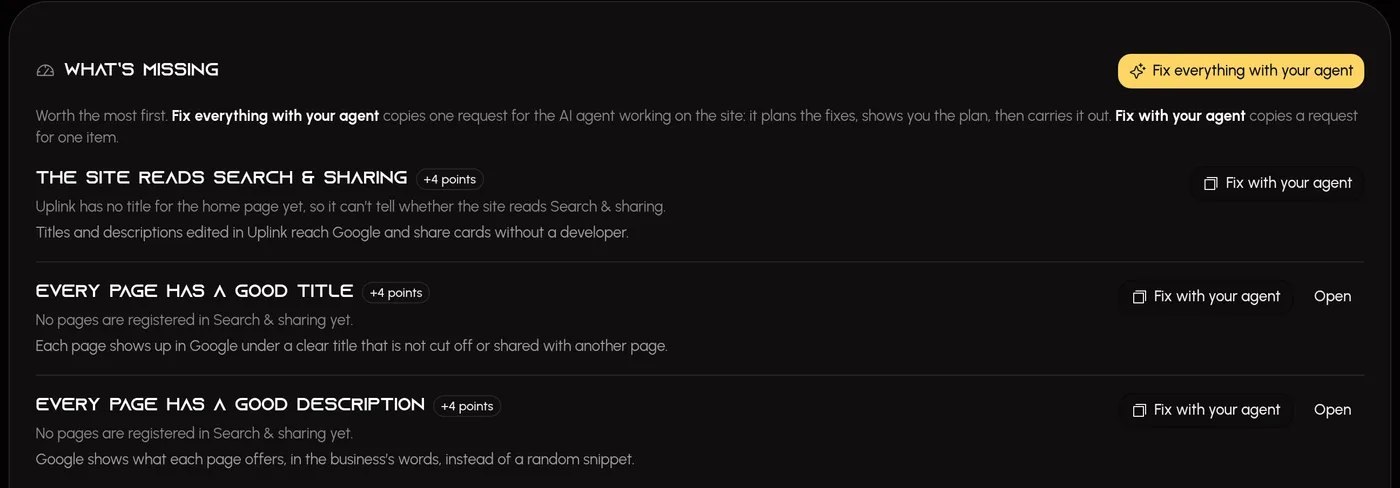
- Fix everything with your agent hands the whole list to the AI agent working on your site: it plans the fixes, shows you the plan, carries it out and checks the site again after you deploy.
- You, your team and your agent all see the same number. It checks the live site again each time you open it, and Check again rescans whenever you like.
alpineridgelodge.com/uplink
02
Built for AI agents
Your agent knows what a good site needs
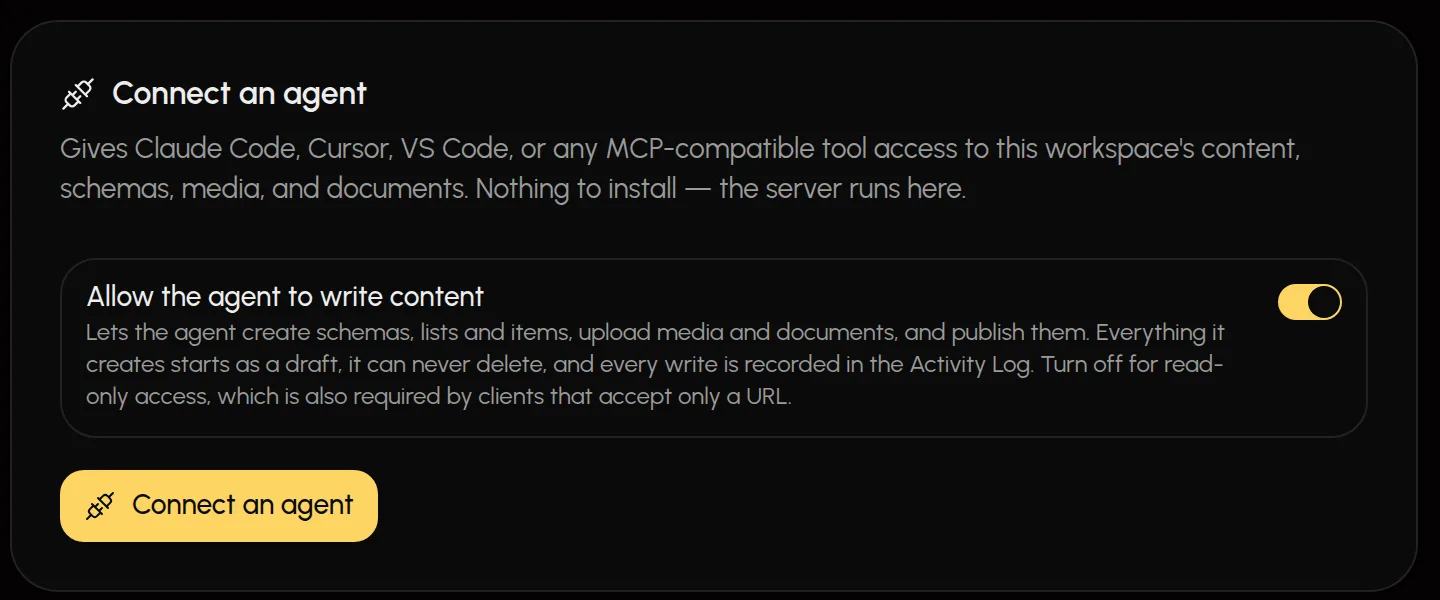
Uplink runs a hosted MCP server. A connected agent can do everything a site uses Uplink for, is told about every capability, can check a project for each one, and gets errors that say what to do next.
- Ask “what can Uplink do for my site?” — the agent checks your project, explains what it is missing in plain words, and asks before changing anything.
- It builds content directly: schemas, lists, posts, media, documents, settings, business info, the theme and search and sharing.
- To connect a site, it asks Uplink for the install files and writes them itself. Nothing to download and run.
- Everything an agent creates starts as a draft, it can never delete or unlock, and editing a published page stores a pending draft instead.
- Every write lands in the Activity Log, attributed to the person who issued the key.
- Using the Claude app? Add Uplink as a connector and sign in — no key to copy. One connector can reach every client you tick, each with its own write switch, and you can add another client to it later from the studio. It can write from the start, so your agent can build the site, and it asks you before it writes from another site’s project.
- Prefer read-only? Flip one switch. Revoke a key and it stops on the very next call.
terminal — one command, per project
claude mcp add --scope project --transport http uplink \
  https://www.uplinkcms.com/api/mcp \
  --header "Authorization: Bearer upl_…"

> Add a "Trail Guide" list with name, miles and difficulty,
  then fill it from trails.csv.

  ✓ create_list        trails        draft
  ✓ upsert_items       3 items       draft
  → Ready for review in Uplink. Publish when you're happy.
03
Fast on phones
Fast on every phone, not just your desktop
A page that feels instant on a desktop that has seen it before can take seconds on a phone opening it for the first time — and the images are almost always why. Uplink ships the fix as code your site installs, not advice.
- Every screen downloads an image only as wide as it shows it. A phone showing a team photo 200 px wide gets a ~600 px file, not the 2000 px copy a desktop hero needs.
- Sent as AVIF or WebP where the browser supports it — falling back to the original rather than ever failing.
- Images are served from your site’s own address and kept by your site’s CDN, so the next visitor gets them from the edge instead of waiting on Uplink.
- The uploaded original — often a 5–10 MB phone photo — is never what a visitor downloads.
- Phones get their own smaller copy of every video up to three minutes long, and desktops a 1080p one when the upload is heavier than a web page needs. Each starts at once from a still frame and streams as it plays — including in Safari on iPhone.
- Every image arrives with a blurred placeholder at the right size, so pages never jump while they load.
What each screen downloads
Desktop hero, full width2000 px copy
Phone, team photo shown 200 px wide~600 px file
The uploaded original, often 5–10 MBnever sent
Per-screen sizesevery srcset width
Your CDNkeeps each size
Videostreams in ranges
app/team/page.tsx
import { UplinkImage } from '@/lib/uplink-image';

// Two columns on phones, four from 1024 px up.
<UplinkImage
  asset={member.fields.photo}
  sizes="(max-width: 1023px) 50vw, 25vw"
/>
04
Business info & legal pages
Uplink is the source of truth. Your site renders.
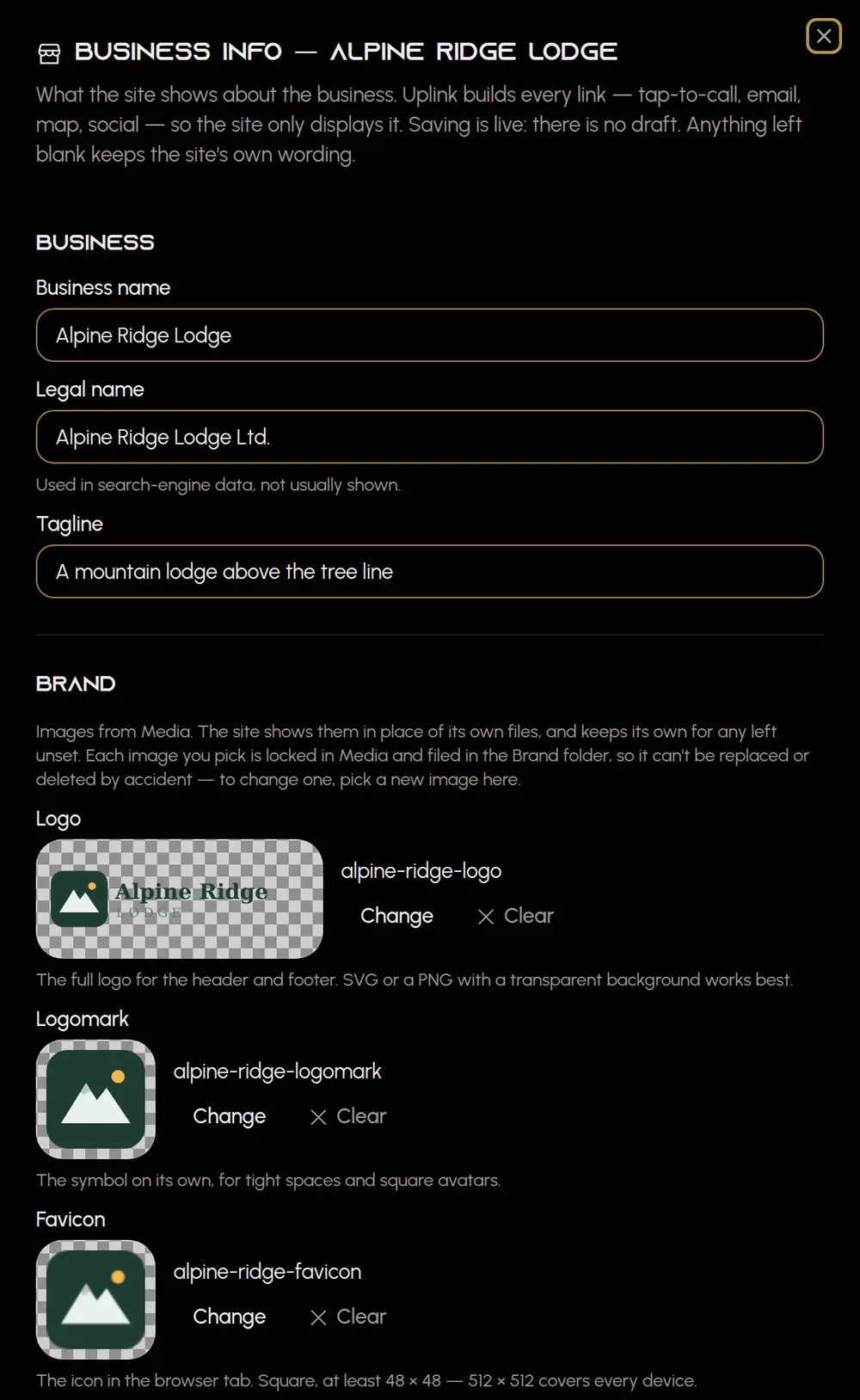
The details every page repeats — name, logo, phone, email, address, the main button, social profiles — are kept in Uplink, never hard-coded in the site. Change the number once and the header, footer and contact page all follow.
- Uplink builds every link for you: tap-to-call, email, a maps link for the address, social profiles with matching icons.
- Search engines get your business details as structured LocalBusiness data, generated from the same record.
- Logo, logomark and favicon are picked from your Media library, or set from the image itself in Media — locked there so they can’t be replaced by accident, and filed together in a Brand folder.
- Anything left blank stays blank, so the site keeps its own wording. Uplink never fills in a value nobody entered.
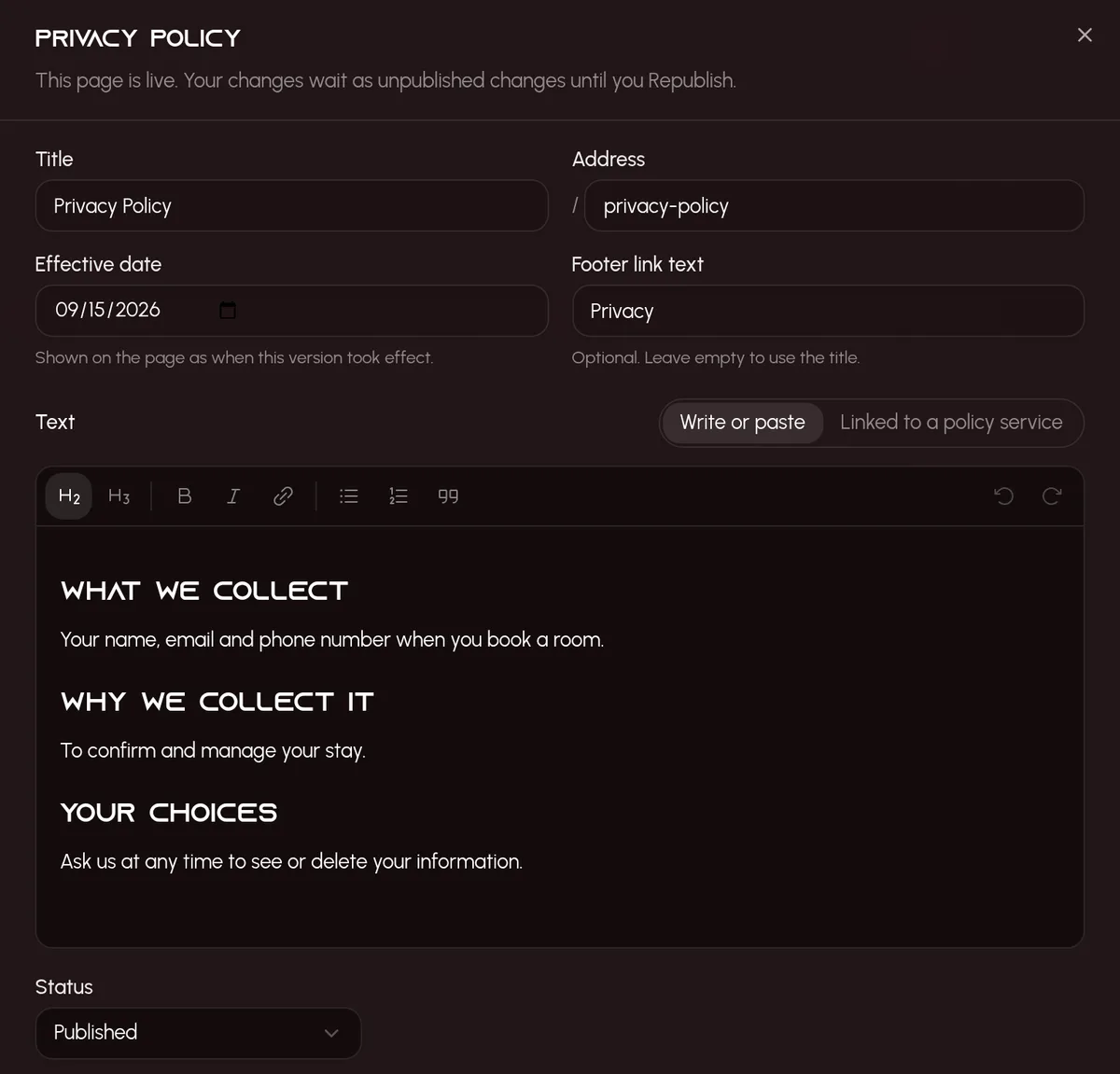
- Terms and privacy pages with drafts like everything else — paste your own text, or link an iubenda or Termageddon policy and Uplink keeps it in sync.
- Uplink never writes legal text. Every publish asks you to confirm the wording is yours and has been reviewed.
alpineridgelodge.com/uplink
05
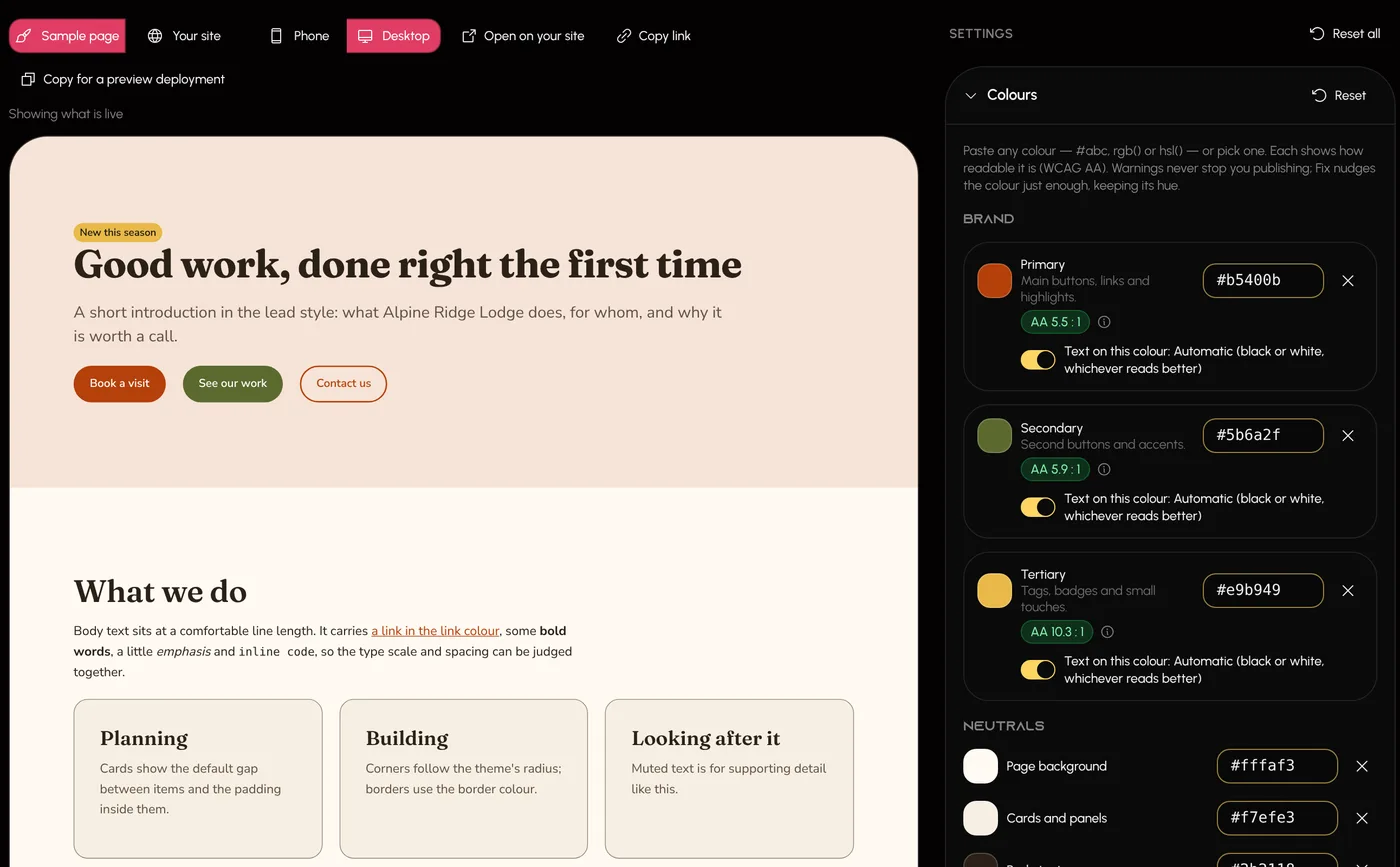
Theme
Your look is set in Uplink, not in the code
Colours, fonts, text sizes, spacing and layout widths are kept in Uplink and drawn by your site, so an agent never hard-codes a brand colour and a new look never waits on a code change.
- Start from a preset, from what your site already has, or from nothing. Anything you leave unset keeps the site’s own look.
- See it on a sample page at phone and desktop width, or on your own live site before it goes live. Only you, and anyone you send the link to, see it there.
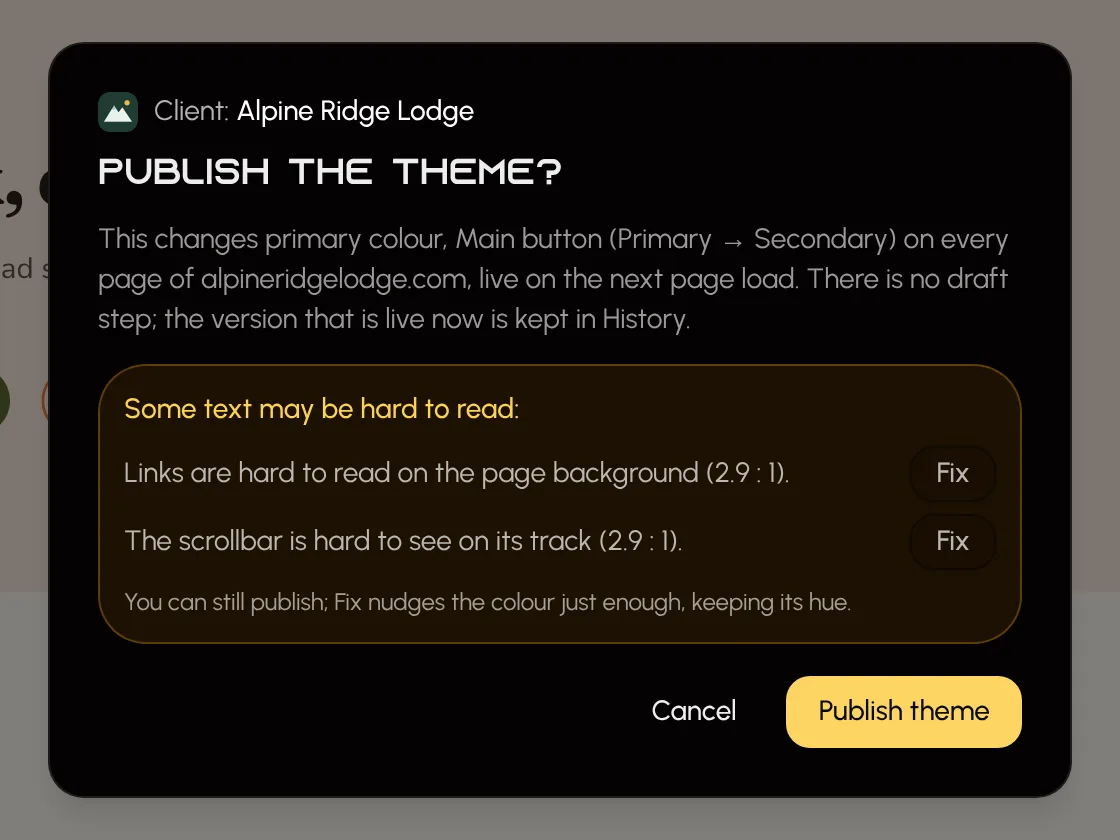
- Contrast is checked as you go, every warning comes with a fix, and publishing asks you to confirm each change.
- Pick any Google Font, upload fonts you license or use your Adobe Fonts kit. Google and uploaded fonts load from your site’s own domain.
- Your agent works in drafts here too: it saves a new look for you to preview and publish, and can give one kind of element, like the main button, a colour of its own.
- There is no box for custom CSS. Every value is checked, and every publish is kept, so you can always go back.
alpineridgelodge.com/uplink
06
Analytics & consent
See who visits, without touching code
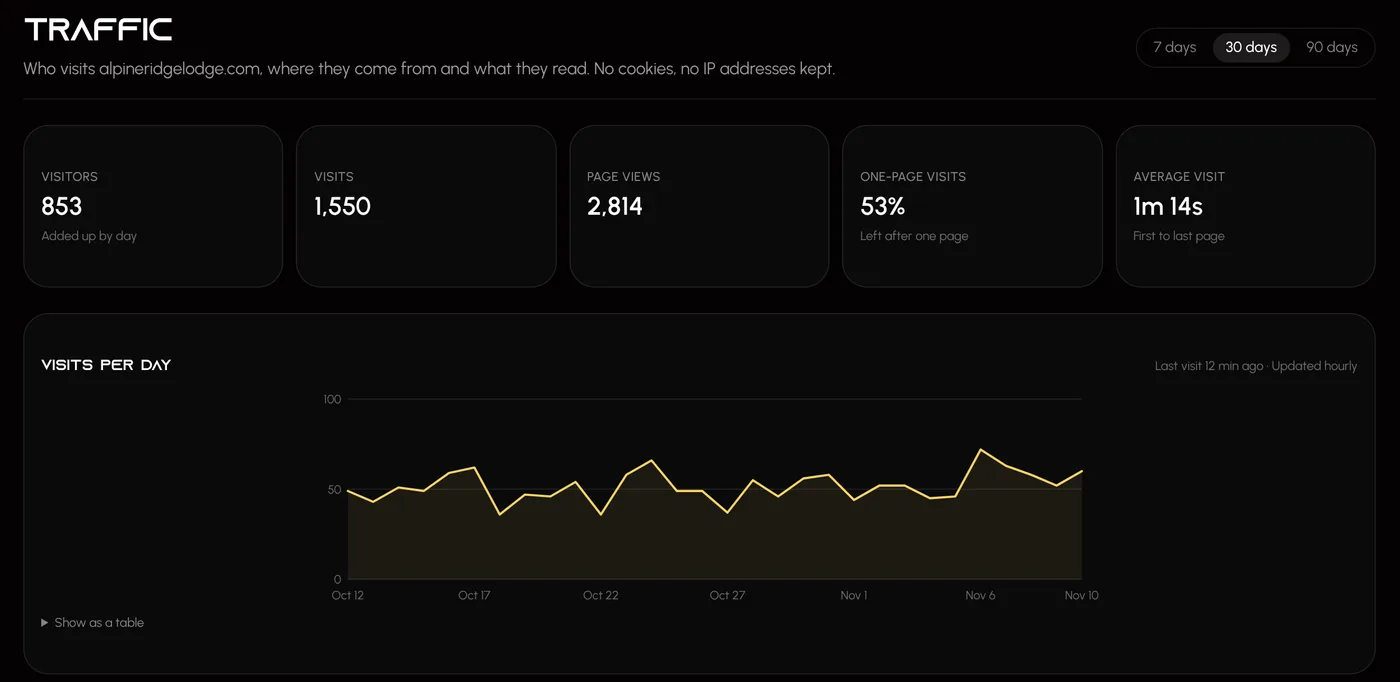
Turn on Uplink Analytics and the studio shows who visits your site, where they came from and what they read — no cookies, and no IP addresses kept. Prefer Google Analytics? Paste its measurement ID instead, with a cookie banner built into Uplink.
- Traffic shows visitors, visits, page views and one-page visits for 7, 30 or 90 days against the days before, with sources, top, landing and exit pages, countries, devices, campaigns and where visitors went next.
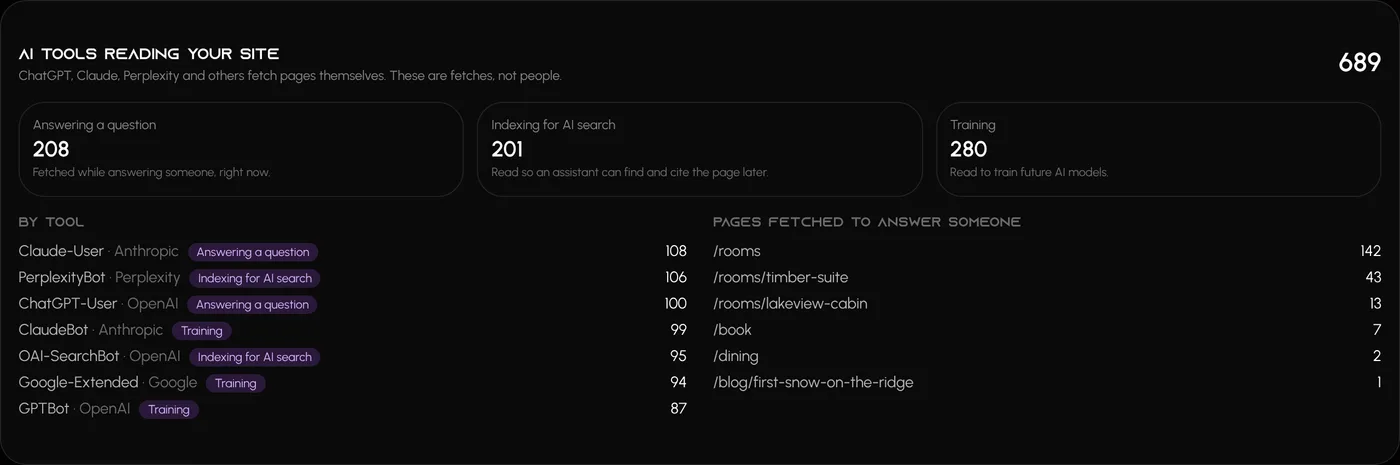
- See which AI tools read your site — ChatGPT, Claude, Perplexity and others — and which pages they fetched while answering someone.
- Recent visits lists the newest visits page by page. Recognising returning visitors is a switch you turn on, and it only counts visitors who accept analytics in the cookie banner.
- Google Analytics 4 is set up in the studio or by your agent, not hand-written into the site. Pause it, change it or remove it the same way.
- A cookie banner built in, on the open-source CookieConsent library, that can take its look from your site’s theme — or connect the CookieYes or Cookiebot account you already use.
- Anything that sets cookies asks visitors first by default, and you choose who the banner asks: every visitor, or only visitors where the law asks first, such as the EU, the UK and Quebec.
- Integrations checks your site as it opens and tells you whether everything really reaches it. When something is missing, it copies a ready-made prompt for your site’s agent.
alpineridgelodge.com/uplink
07
Search & sharing
Found by search engines and AI answers
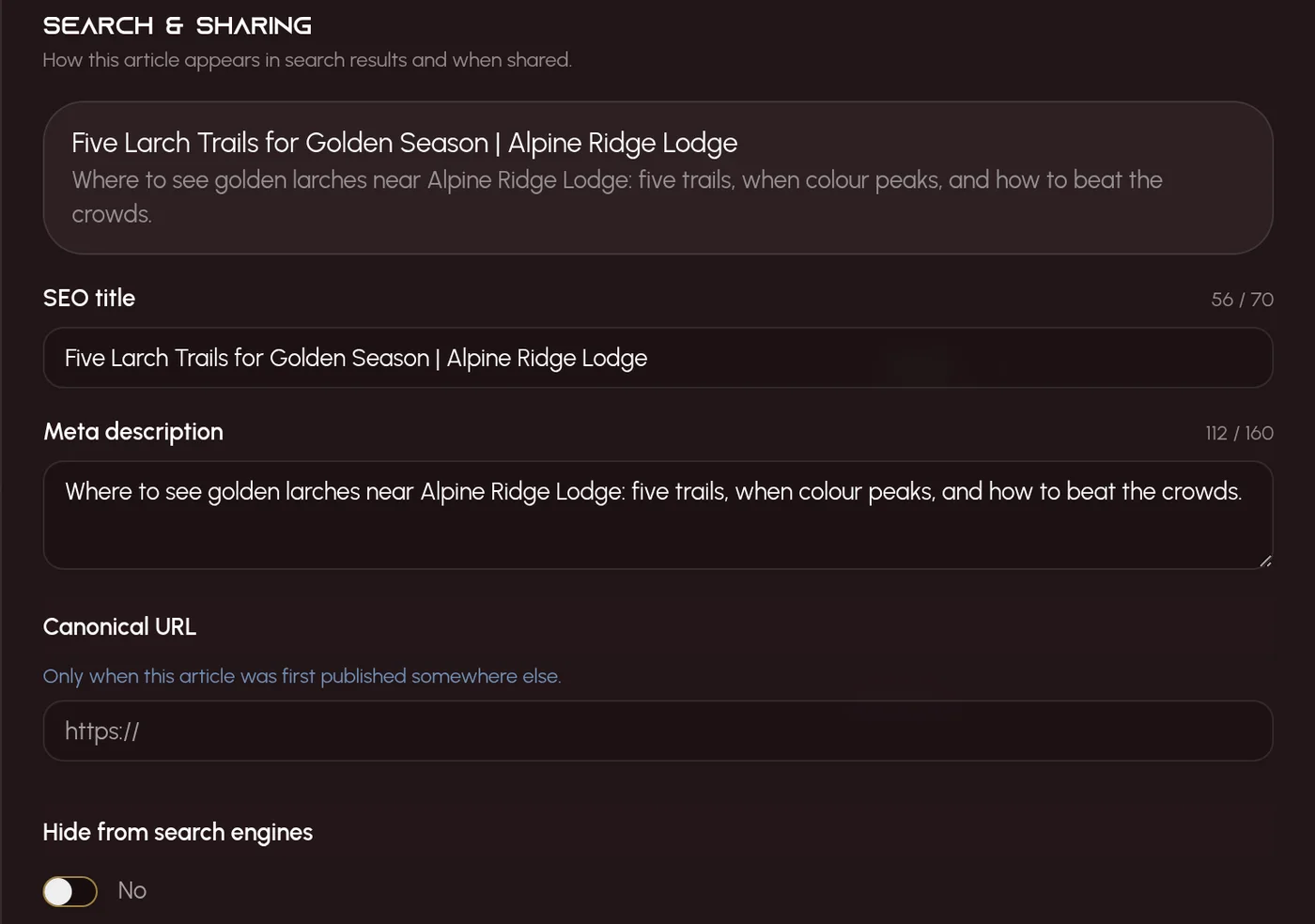
Every page gets the title, description, share card and plain answers that search results and AI assistants look for — written by your agent from what the business has said, and checked by you.
- Your agent reads each page and writes its title, description and the questions it answers, marking each one for you to check — never inventing a price or a promise.
- Show the questions on the page, tuck them into an accordion, or keep them for AI tools only.
- Uplink keeps the sitemap, robots.txt and an AI index up to date, and one switch decides whether AI tools may read the site.
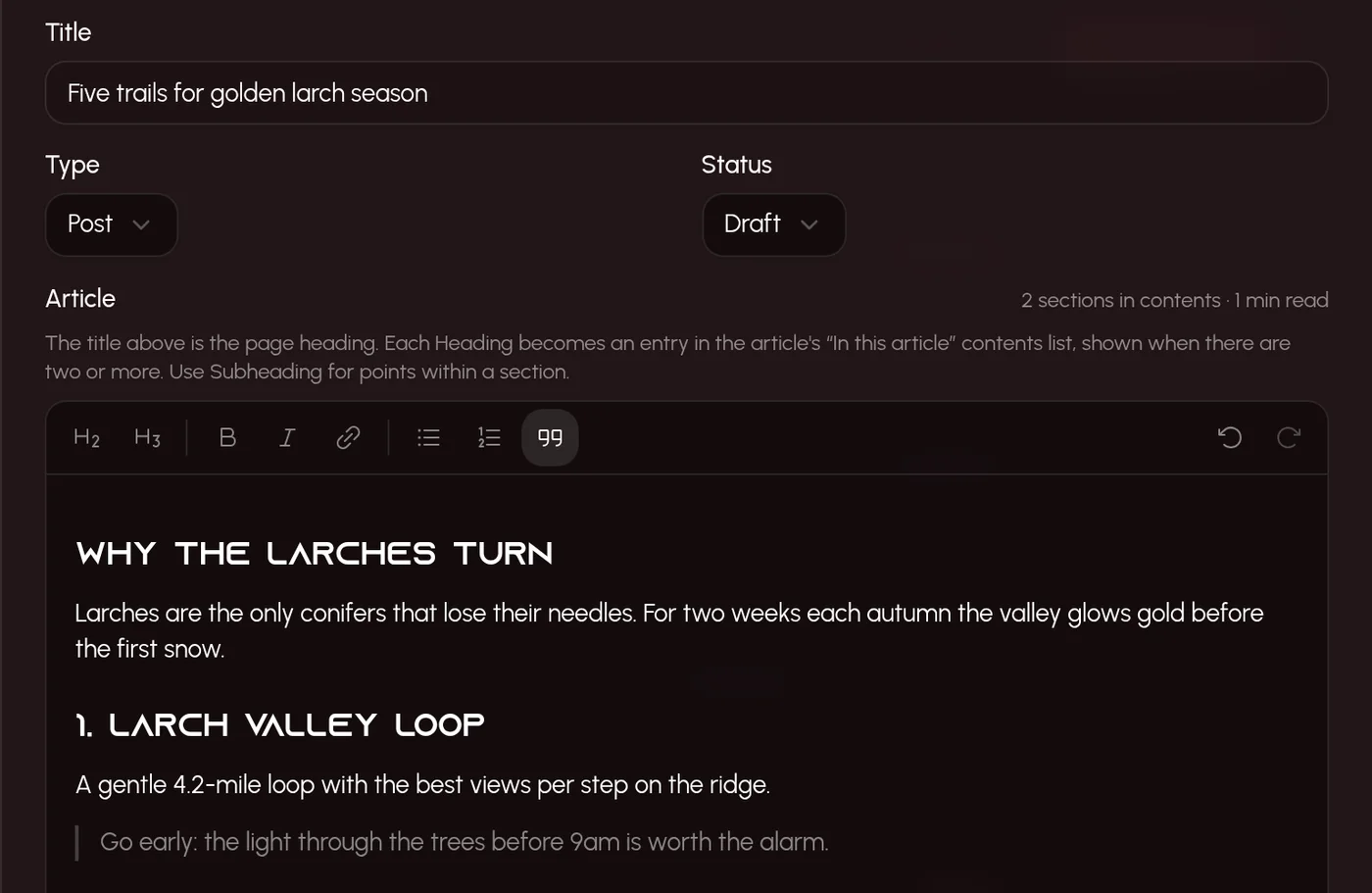
- Posts are real articles: a clean editor with contents and reading time, key takeaways, an FAQ and sources on every one.
- A post can’t be published without an excerpt, a featured image and a date — in the studio and from an agent alike.
- Rename an article and its old address still finds it, so your site can redirect old links instead of breaking them.
Edit post
08
Drafts & Republish
Nothing goes live by accident
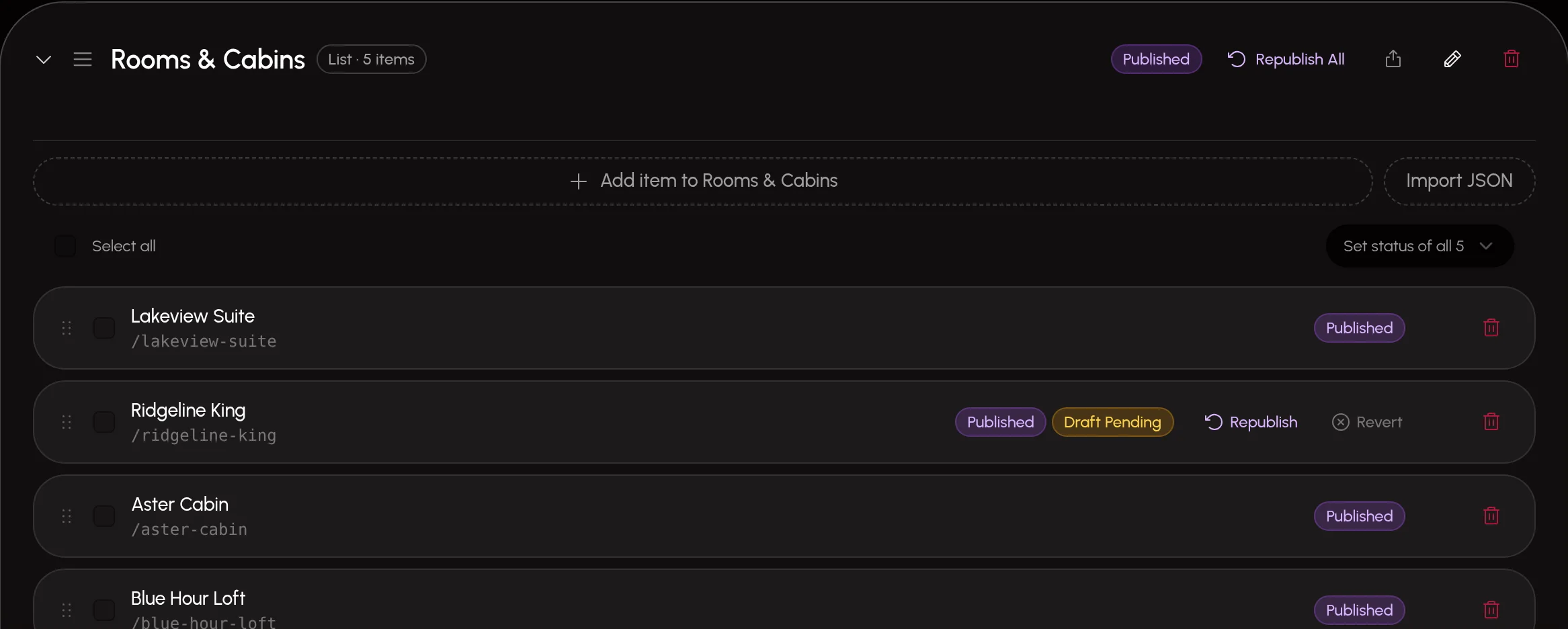
Whoever or whatever edits a live page — you, a client’s editor or an agent — the site doesn’t flinch. The edit is saved as a Draft Pending next to the published version, and goes live only when a person presses Republish.
- Every item is Draft, Published, Unlisted (reachable by direct link, hidden from feeds) or Archived (kept, but never on the site).
- A site that forgets to filter still never shows a draft. Safe is the default, not a setting.
- Deleting, discarding or overwriting always asks first, and says what will be lost and whether it’s live.
- Leave a page with unsaved changes and the studio asks first, naming what would be lost.
- Republish one item, a whole list, or everything waiting — in one click.
alpineridgelodge.com/uplink
09
Structured content
Content shaped like your site
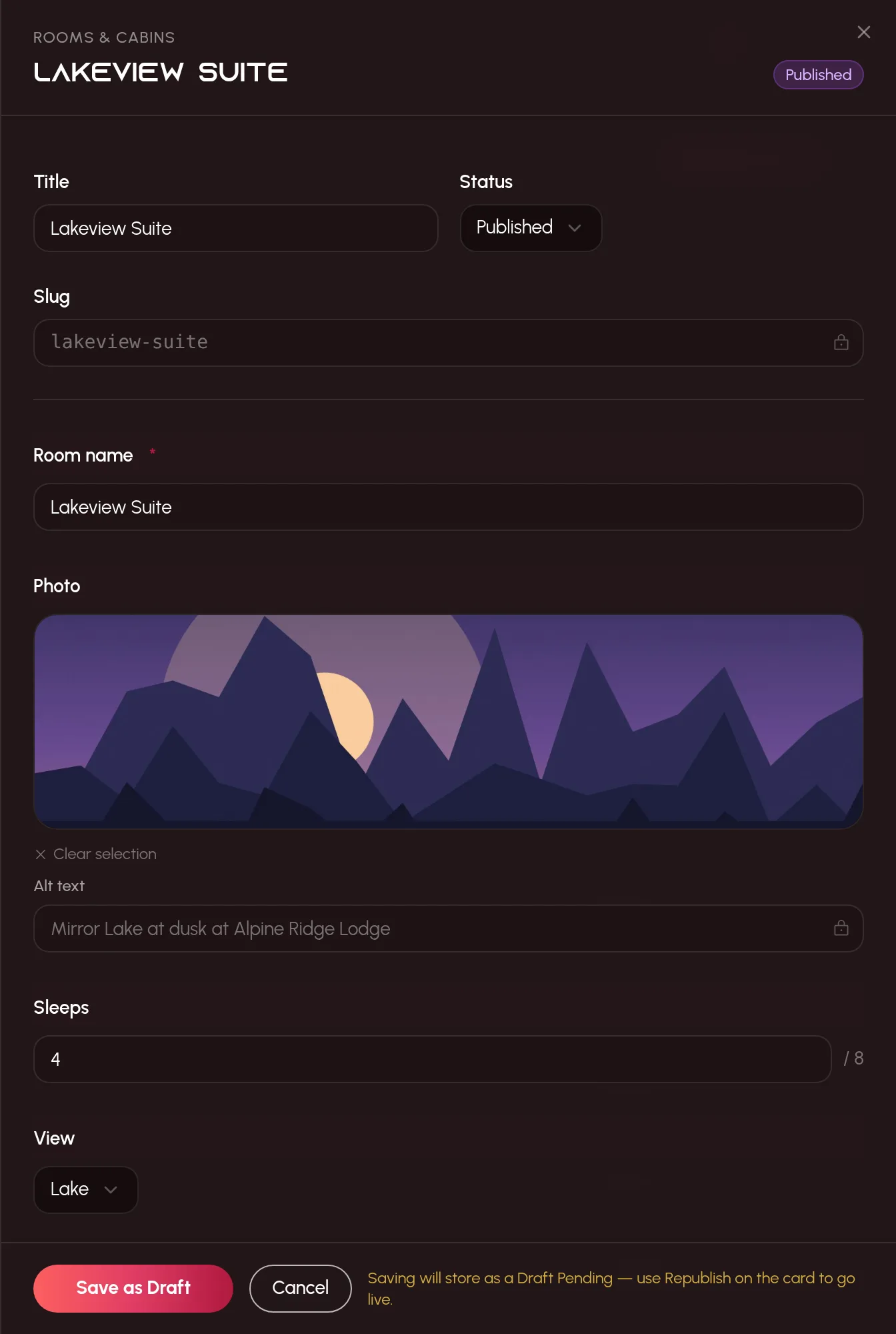
Define a list once — rooms, team members, FAQs, trails — or let your agent do it. Editors get a clean form for it; the site gets typed JSON with exactly the fields it asked for.
- 20 field types: text, long text, media, a Media folder, dropdowns, ratings, sliders, dates, colours, icons, nested objects, arrays and references to other lists.
- Pick images straight from the media library, with alt text carried along.
- Reorder by drag and drop, bulk-change status, or import a whole list from JSON.
- Save a list’s shape as a schema template and reuse it on the next site.
10
Media library
Images and video, handled
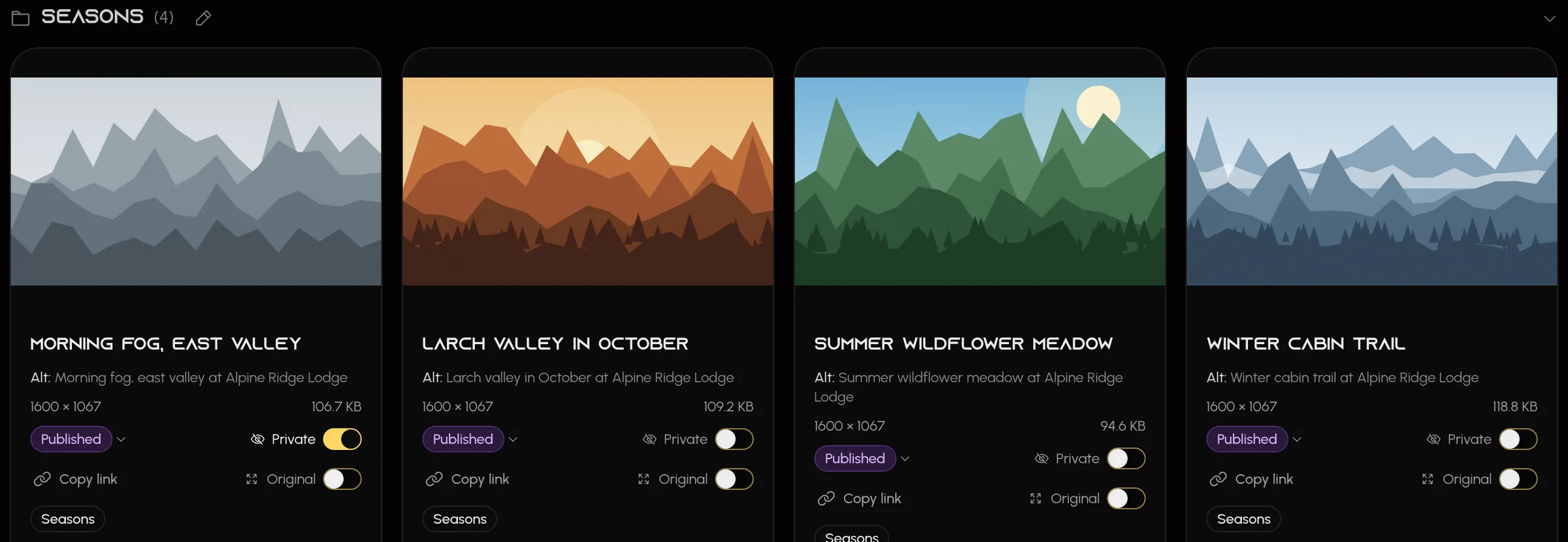
Upload once, use everywhere. Images and video live in one library, and every one is made ready for the web — sized copies, alt text and placeholders — without anyone asking.
- Private images are never handed out without your API key.
- Lock the files your code depends on — the database itself refuses to replace, move or delete them.
- Drop in one file or a whole batch: each gets its own row and progress, and one that fails never stops the rest.
- Alt text is written for you on upload — for a video, from stills across the clip — and left empty, never made up, when it can’t be.
- A file too big to upload? “Make it smaller” shrinks it in your browser first, and says how long that will take. A heavy video gets “Make it lighter”, or goes up as it is — your choice.
- Every video’s poster still is picked from the clearest of its first few seconds, skipping black and blank frames. Pause on another frame to make that the poster instead.
- Folders inside folders, tags and an “Original” switch for images and videos that must be exact.
alpineridgelodge.com/uplink
11
Repository backups
You own your site
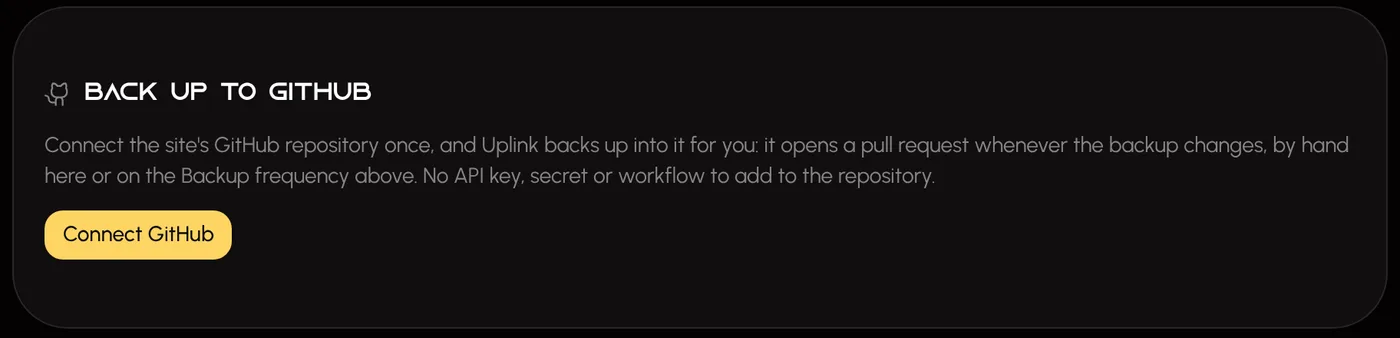
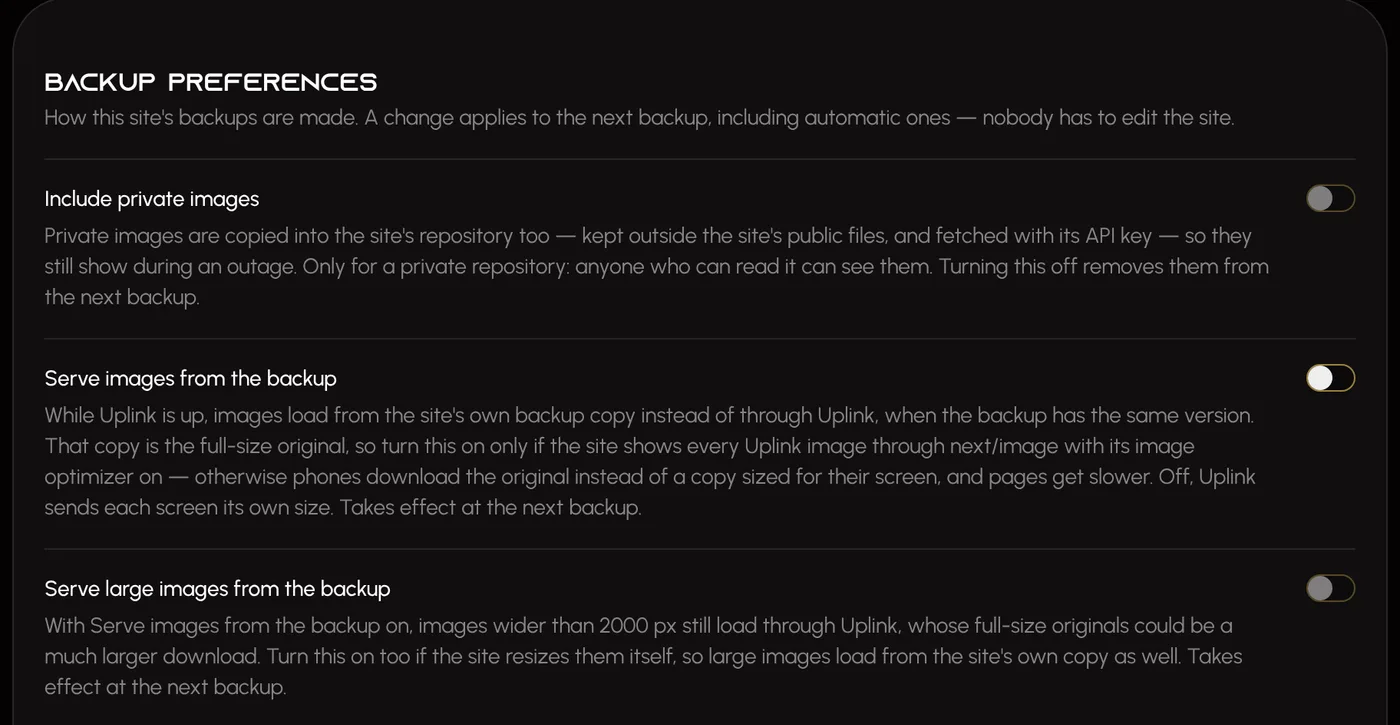
Your site keeps a copy of everything it shows from Uplink in its own repository, and keeps working from it if Uplink is ever unavailable. Uplink keeps no copy of its own — and a client that leaves keeps a working site.
- Content, images, documents, business info, legal pages, integrations, your theme (with its fonts) and search & sharing are written into your repo as plain files you can read and diff.
- Press Connect GitHub and pick the repository: Uplink makes each backup itself, with no key, secret or workflow to set up. It opens a pull request only when something changed, and never merges it.
- Rehearse an outage safely: switch a client Offline and watch the site fall back, then bring it back online.
- If you choose, images can load from your own copy even while Uplink is up, when it is the same version.
alpineridgelodge.com/uplink
Everything else, done carefully
The details a good site needs and nobody remembers to ask for.
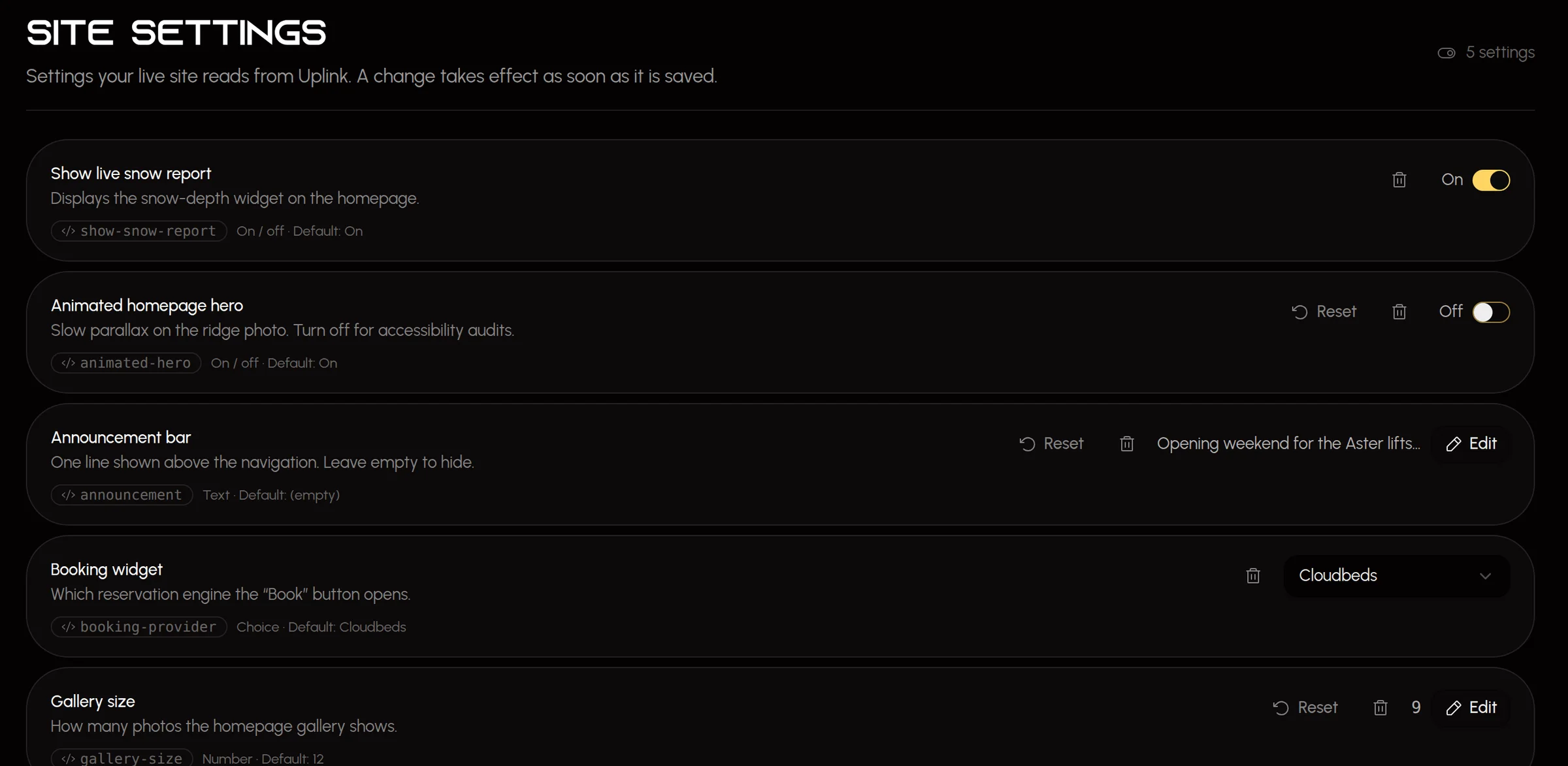
Live switches, no redeploy
Turn the animated hero off, change the announcement bar, pick the booking widget. Your agent defines the settings; people flip them — confirmed first, live at once.
Instant updates
Signed webhooks with cache tags tell your site exactly what changed, so the right pages refresh the moment you publish.
Roles that fit real teams
Client admins, editors and viewers — per client — plus agency admins for every client an agency looks after. Someone can run one site and only read another.
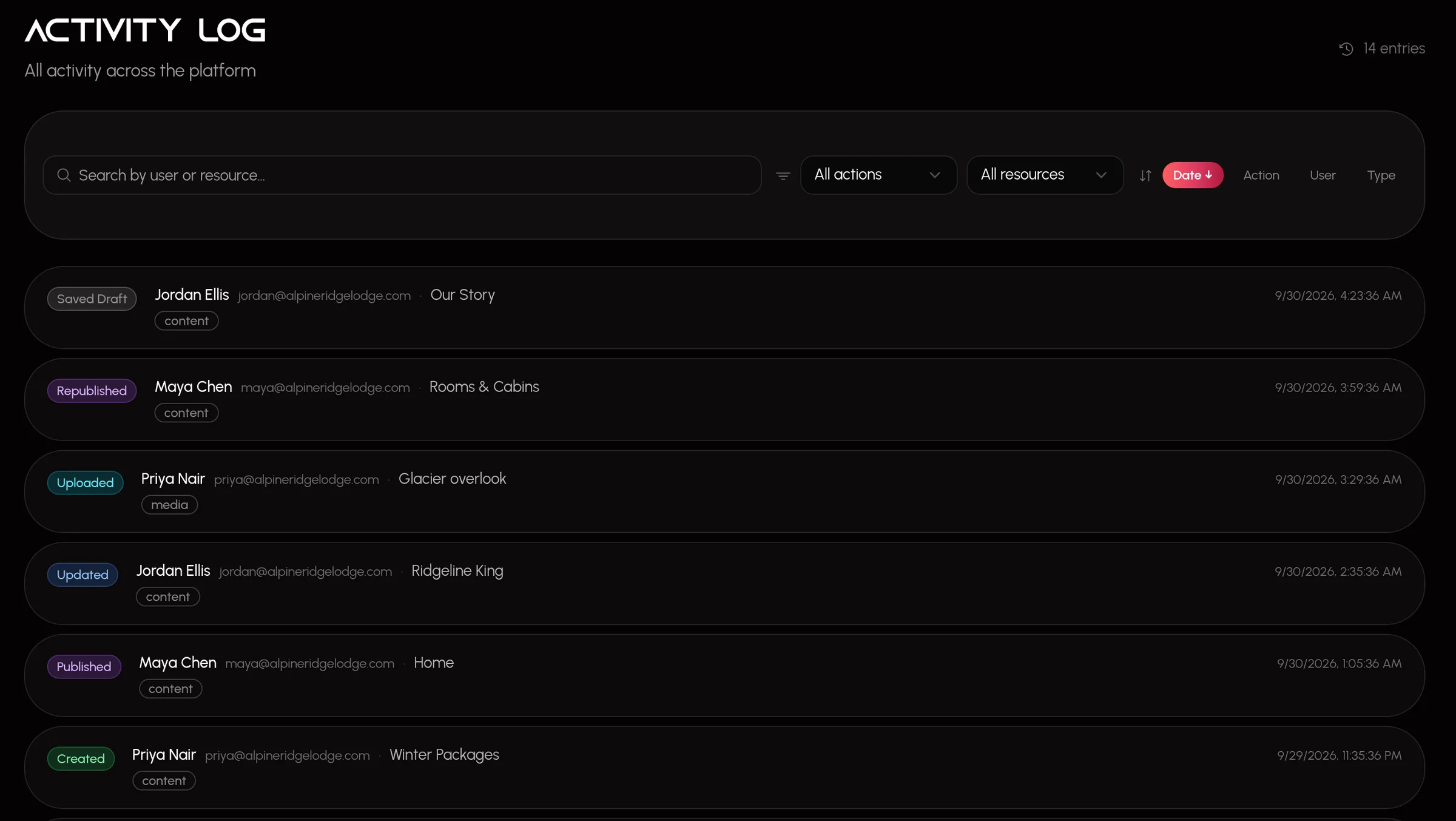
A ledger of every change
Who published the homepage, who changed the announcement, which agent key uploaded that photo. Open any entry to see exactly what changed, and revert a change to business info, settings, search and sharing or integrations in a click.
Documents with history
Replace a PDF and the old one is archived, never overwritten. Restore any version in a click; links to the document keep working.
The studio lives on your site
Editors sign in at yoursite.com/uplink. No new domain to remember, no separate tool to find.
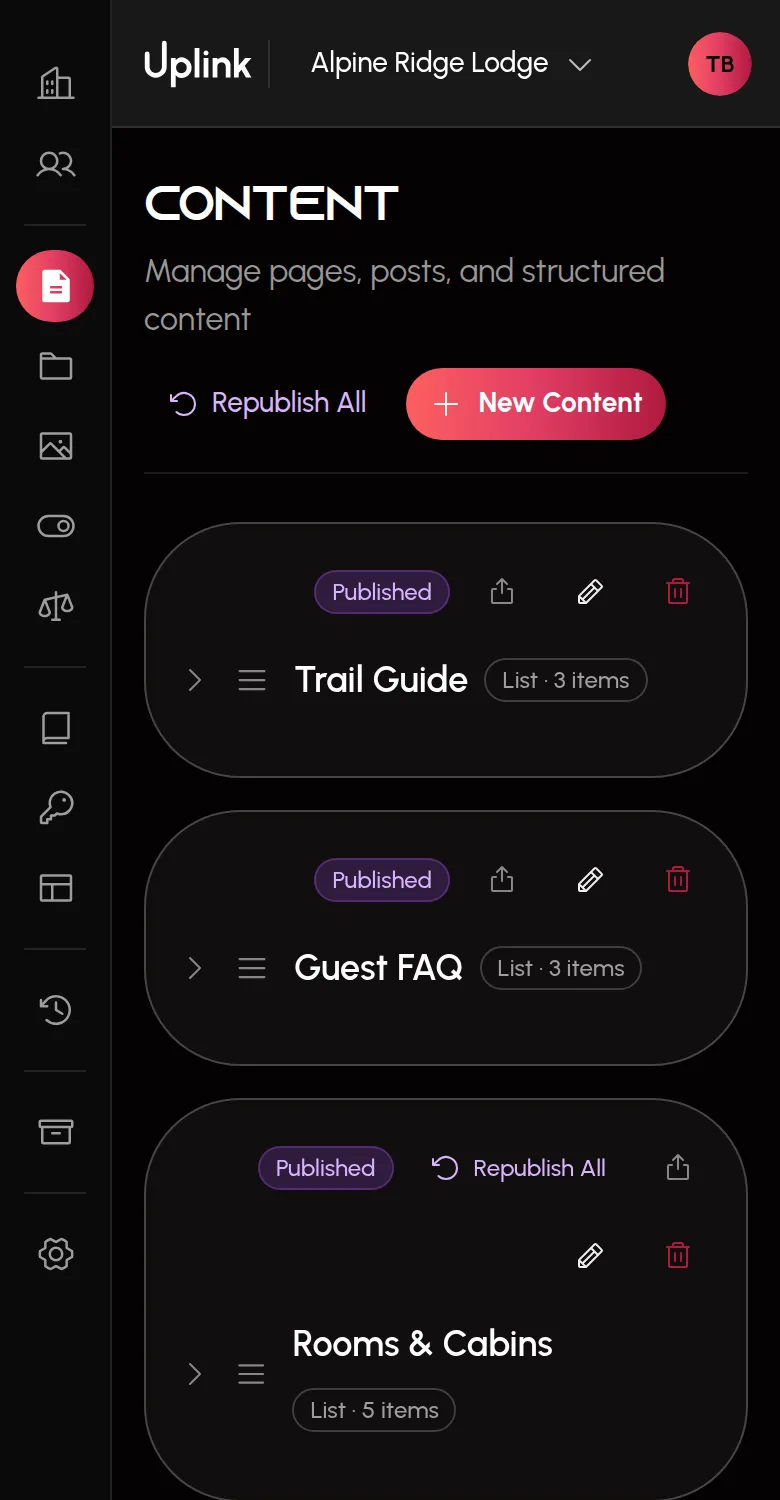
Edit from your phone
The studio fits a phone screen: navigation slides over the page, and cards and settings use the whole width. Review a draft or flip a switch from wherever you are.
Legal pages, kept current
Your site gets the text cleaned up, with a table of contents and the effective date. A policy linked to iubenda or Termageddon is checked daily, and any change arrives as a draft for you to review.
alpineridgelodge.com/uplink
For agencies & studios
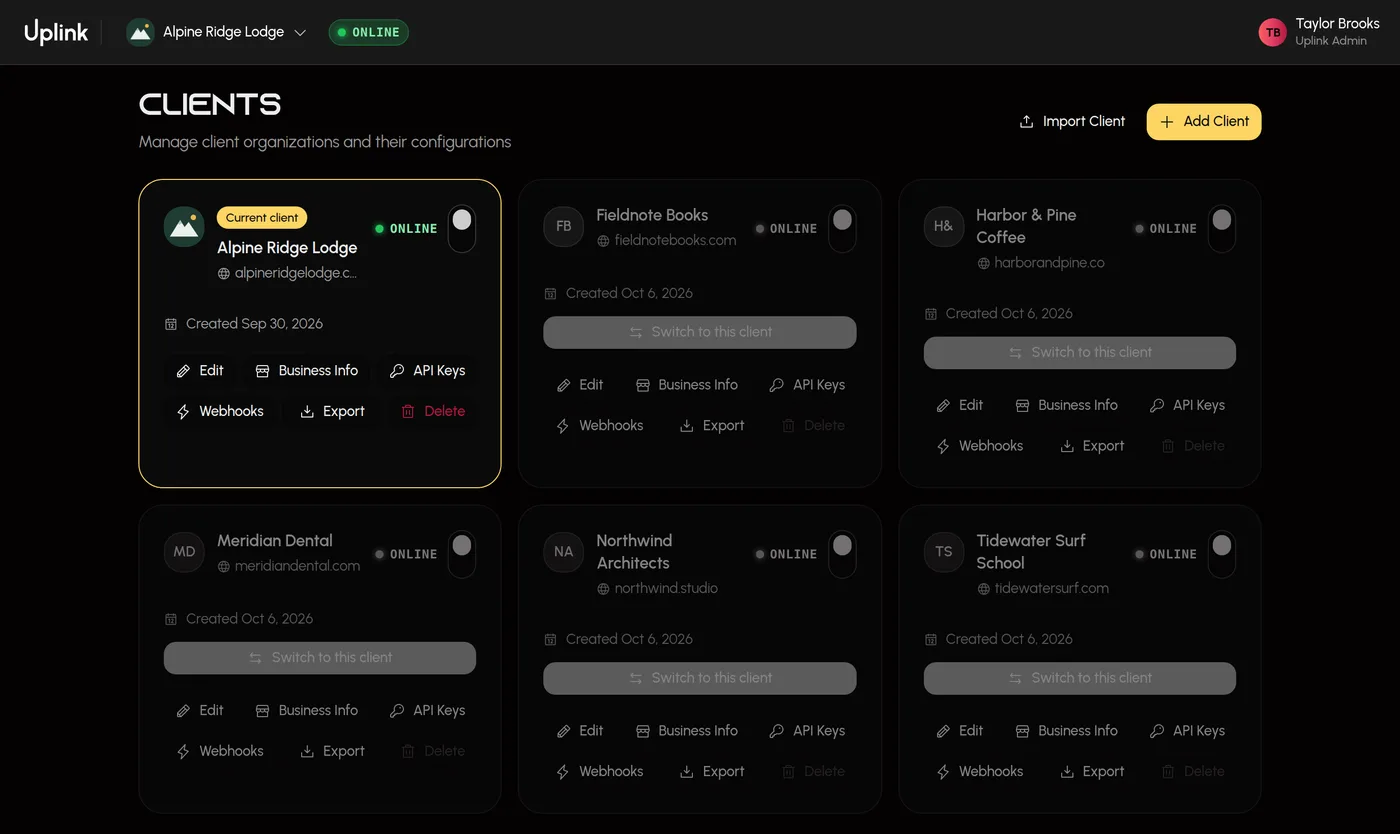
Every client site. Editors who can’t break them.
Run every client site from a single place, switch between them in a click, always see which one you’re in, and never worry that one client can see another’s work.
- Each client’s data is isolated by the database itself, not just the interface.
- Invite a client’s own team from the studio as admins, editors or viewers — and resend or revoke an invitation that is still waiting.
- Make your people agency admins once, and they manage every client the agency looks after — adding clients and inviting each client’s team.
- The agency’s own details — name, website, contact and a footer credit — are kept once and served to every site it looks after, so a “Website by …” link is never hard-coded.
- Each client shows its own logo, the one you’re working in is marked, and every confirmation names the client it acts on.
- Export a client and import it into another instance, content and all.
www.uplinkcms.com
For developers
Any stack. Next.js first.
Anything that can make an HTTPS request can read from Uplink: your pages ask for what they need and get clean JSON back. The API, the agent tools and the data never assume a framework; Next.js gets the first and most complete install files.
- On Next.js, the install files are the studio page, a typed fetch helper (lib/uplink.ts), <UplinkImage>, the site’s own media route, and the components that apply the theme, analytics and cookie banner — nothing else. Your agent writes them, or one installer command does.
- With the Next.js helper, a wrong host or key fails the build with the fix in the message, instead of shipping a site with every section silently empty.
- Your site’s key can only read. Write access is a separate switch, for the agents you choose.
- The full guide is served to agents too, at /api/v1/docs.
any stack — it’s just HTTPS
curl \
  "https://www.uplinkcms.com/api/v1/content?type=list&slug=rooms" \
  -H "Authorization: Bearer $UPLINK_API_KEY"
lib/rooms.ts — the Next.js helper
import { getUplinkJson, isUplinkConfigError, UplinkError }
  from '@/lib/uplink';

export async function getRooms() {
  try {
    return await getUplinkJson<RoomsList>('/api/v1/content', {
      searchParams: { type: 'list', slug: 'rooms' },
    });
  } catch (error) {
    if (isUplinkConfigError(error)) throw error; // fail loudly
    if (error instanceof UplinkError) return null; // fall back
    throw error;
  }
}
one room, as your page receives it
{
  "title": "Lakeview Suite",
  "slug": "lakeview-suite",
  "status": "published",
  "fields": {
    "name": "Lakeview Suite",
    "sleeps": 4,
    "view": "Lake",
    "fireplace": true,
    "photo": {
      "altText": "Mirror Lake at dusk",
      "width": 1600,
      "height": 1067,
      "blur_data_url": "data:image/jpeg;base64,…",
      "image_url": "…/api/v1/media/…/image?v=1"
    }
  }
}
Questions
The things people ask before they plug their site into Uplink.
I don’t really know what a good site needs. Is Uplink for me?+
Yes — that is who it is built for. Uplink carries the know-how: images sized for each screen, visitor analytics without cookies, a cookie banner, structured business data, search and sharing details, legal pages and backups. Your agent is told about every one, checks your project for it, and the Uplink Score shows what is still missing.
Does Uplink build or host my site?+
No. Uplink is not a site builder, a page designer or a host. Your site’s code is yours, deployed wherever you like; it reads what it shows from Uplink and renders it. Uplink holds the content, media, documents, business info, theme, legal pages, integrations and settings.
Do we have to rebuild our site to use Uplink?+
No. Your site reads from a plain HTTPS and JSON API, whatever it is built with. On Next.js, your agent can ask Uplink for the install files and write them itself: the studio page at /uplink, a small typed fetch helper, an <UplinkImage> component, a media route that serves images from your own site, and the components that apply your theme, analytics and cookie banner. Nothing else about the site changes.
I only have an idea. Can I start a new site with Uplink?+
Yes. The Launch page in your workspace walks you from nothing to a live site, one step at a time. Connect your agent, then one Deploy to Vercel button copies a Next.js starter with Uplink already built in to your own GitHub and puts it online, so your text, logo, colours and contact details live in Uplink from the first day, not in the code. Your agent builds the pages from your idea, mockups or existing code, Launch turns on instant updates for you, and each step is ticked off as it happens.
Can an AI agent break the live site?+
It is built so it can’t. Everything an agent creates starts as a draft, an agent can never delete or unlock anything, editing a published page stores a pending draft rather than changing the live one, and every write is recorded in the Activity Log against the person who issued the key. A person decides what goes live.
Can Uplink add custom CSS, HTML or scripts to our site?+
No, on purpose. Everything Uplink sends a site — the theme’s CSS, the analytics tag, the cookie banner — is built by Uplink from checked values, never typed in as code. So no editor or agent can slip code onto your live site through Uplink.
Will the site be fast on phones?+
That is what <UplinkImage> and the installed media route are for. Each screen downloads an image only as wide as it shows it, your site’s CDN keeps every size so the next visitor gets it from the edge, the multi-megabyte original is never sent, and phones get a smaller copy of short videos that streams from a still frame. Agents connected to Uplink know the standard too, and can check an existing site for anything slowing it down.
What happens to our site if Uplink is unavailable?+
With repository backups on, your site carries its own copy of everything it shows — content, images and documents — committed to its own repository. When Uplink can’t answer, the site serves that copy. Uplink never stores the backup itself, and a client that leaves keeps a working site. You can rehearse the whole thing safely with the Online / Offline switch.
Will Uplink write our privacy policy?+
No. Uplink publishes the legal text you provide — pasted in, or pulled from an iubenda or Termageddon policy — and never writes, checks or gives advice on it. It can start you from an outline of headings, but a page can’t be published until every prompt is filled in and you confirm the wording is yours.
We look after many client sites. Does Uplink fit an agency?+
Yes. One studio holds every client, each client’s data is isolated in the database itself, and roles are per client — someone can be an admin for one client and a viewer for another. An agency’s own people can be made agency admins, who manage every client the agency looks after and invite each client’s team. Clients can be exported and imported between instances.
Is Uplink only for Next.js?+
No. The API, the agent tools and the data shapes never assume Next.js, so Astro, Nuxt, SvelteKit, Remix, Rails, Django, PHP or a static-site build can all read from it. Next.js gets the first and most complete install files: the embedded studio at /uplink, <UplinkImage>, the theme and integrations components, and the backup fallback reader.
Plug your site into Uplink
Connect your agent, see what your site is missing, and let it fill the gaps — with a person deciding what goes live.